Routines
Work that runs without you. A Routine is a cron rule + a prompt + a repo, owned by the daemon. Every firing creates a fresh task — its own worktree, its own branch, its own engine session — with the prompt as that session's first message.
That last part is the design, not an implementation detail. A run is not a hidden background job with a log file somewhere; it is an ordinary task in your sidebar that you can open, read, disagree with, and keep talking to. Scheduled work you cannot inspect afterwards is not worth scheduling.
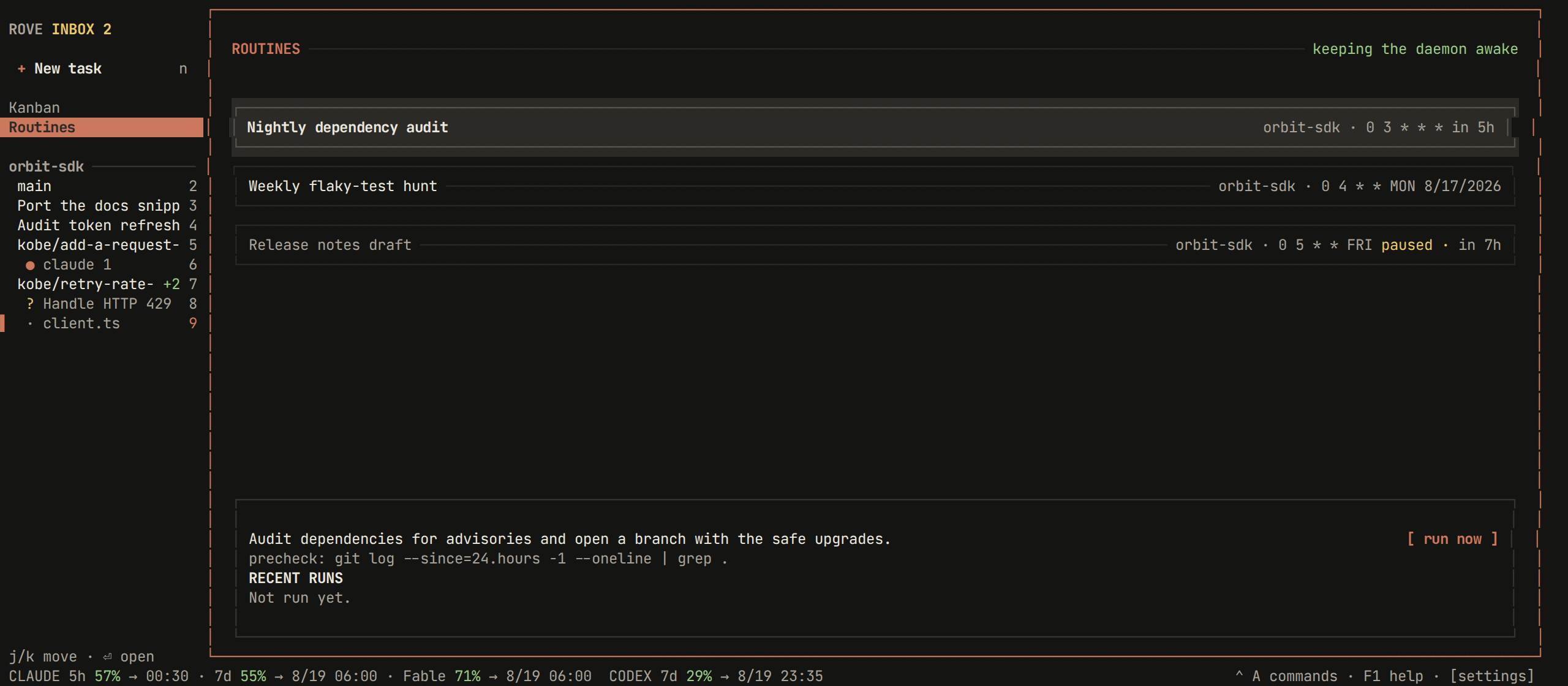
Two minutes to your first routine
The example throughout this page is the one in the screenshot: every morning at 03:00, audit this repo's dependencies and open a branch with the safe upgrades.
From the TUI
ctrl+a2(or click Routines in the sidebar rail) opens the page.nopens the composer.tab/shift+tabwalk the fields: name, repo (a scrolling picker over your projects), prompt, and schedule — five labelled cells (min / hour / day / month / weekday) where←/→picks a cell and↑/↓changes it. The composer restates the next fire time in your own clock as you type ("weekdays at 12:00 · in 2d · Mon 12:00"), so a cron expression you got wrong is visible before you save it.sruns it once, right now. Do this — it is how you find out the prompt works without waiting a day for the schedule, and it does not shift the next scheduled run.enteropens the task that run created. From here it is a normal session.
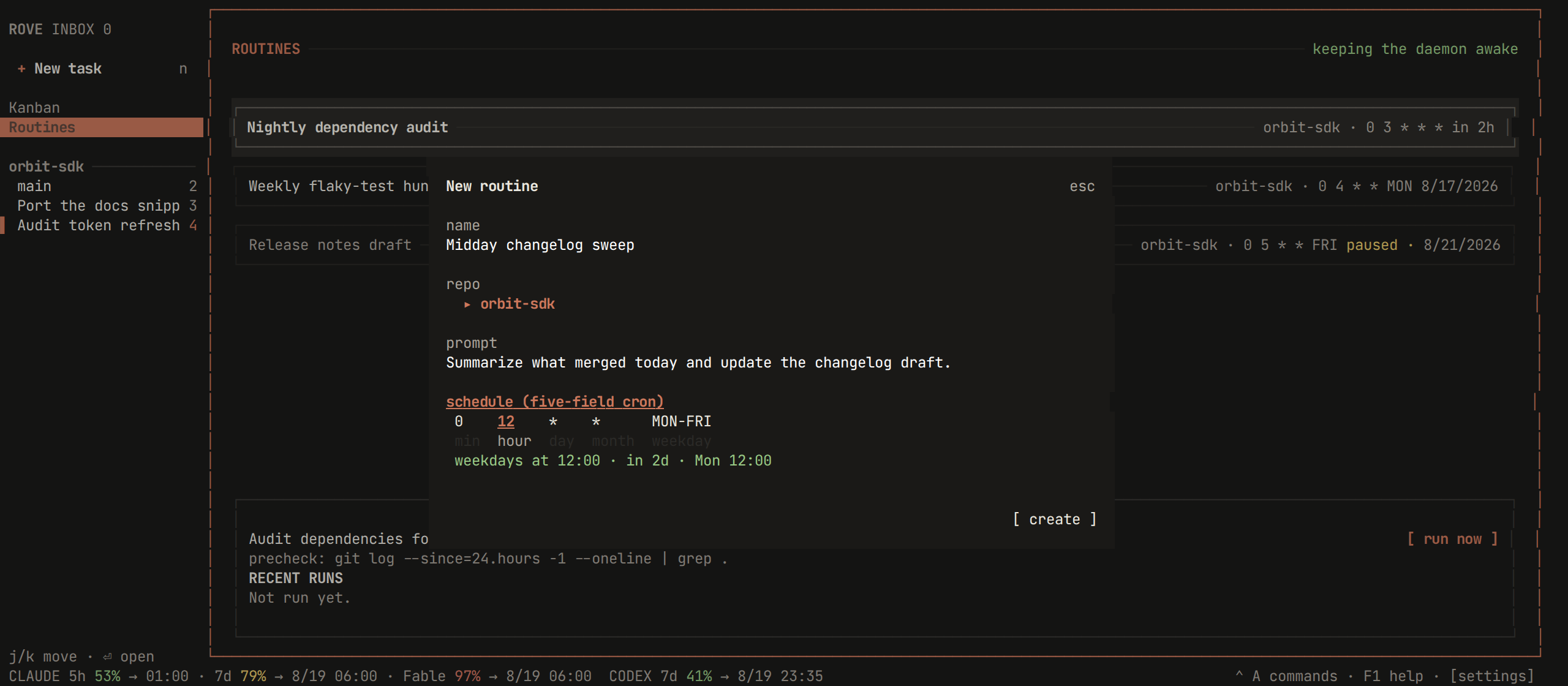
There is no in-page editing: recreate the routine, or use rove api routine-update. A precheck (below) is CLI-only — it is the one field that is
genuinely optional.
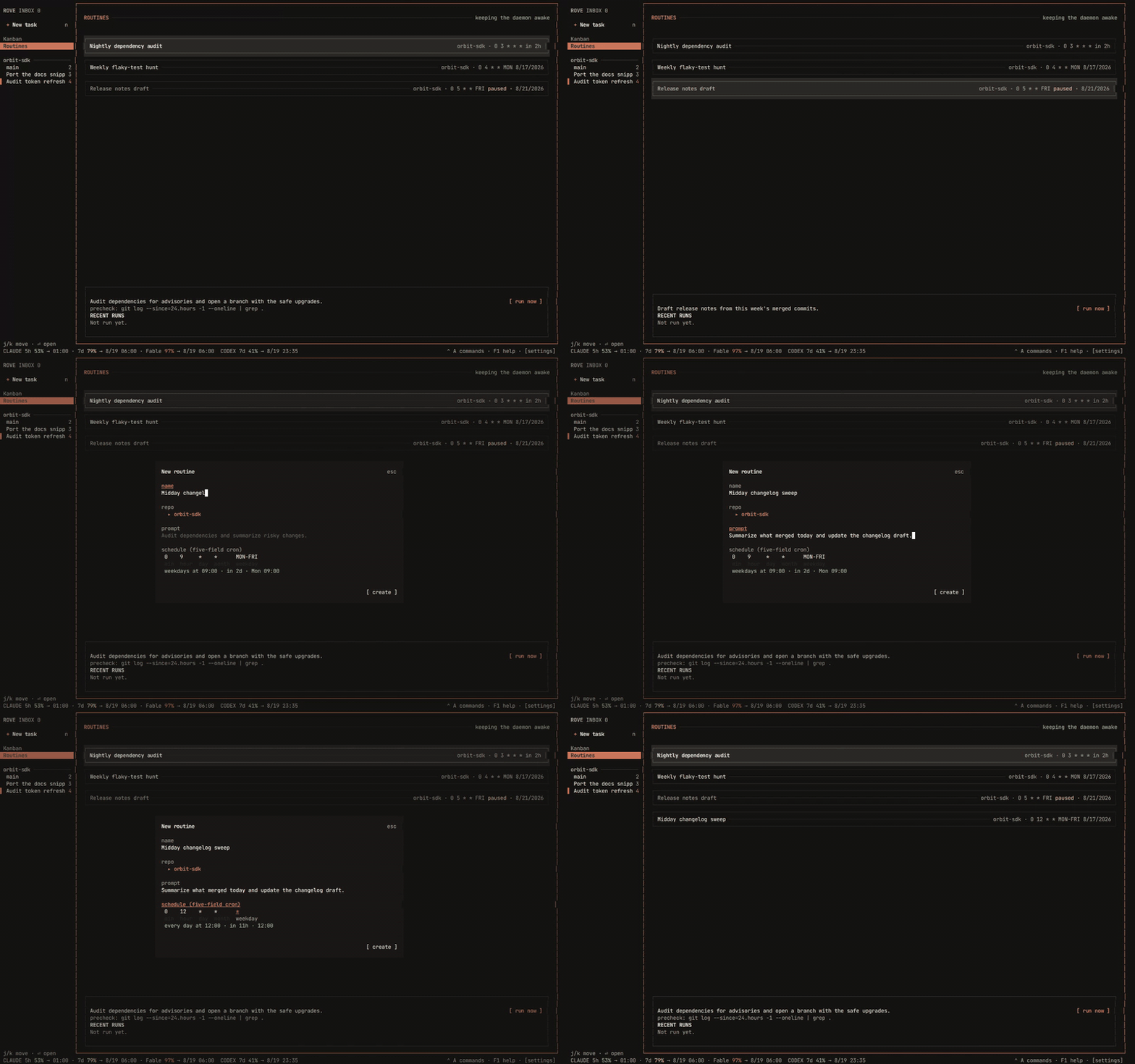
The page end to end — walking the schedules, pausing one, then composing a routine whose next fire time is restated in plain words as the cron cells change:
From the CLI
The same routine, with the precheck the TUI cannot set:
rove api routine-create --repo . \
  --name "Nightly dependency audit" \
  --prompt "Audit dependencies for advisories and open a branch with the safe upgrades." \
  --schedule "0 3 * * *" \
  --precheck "git log --since=24.hours --oneline | grep -q ."

rove api routine-list                       # every routine + its next run
rove api routine-run-now --id <id>          # fire it now, skipping the precheck
rove api routine-runs --id <id>             # run history, newest first
Full flag list: rove api schema --group routine, or rove api.
Reading the page
| Where | What it tells you |
|---|---|
| Header, right | Whether an enabled routine is keeping the daemon awake right now |
| Row | Name, repo, five-field schedule, and the next run in relative time (in 5h) — or paused |
| Detail box | The selected routine's prompt, its precheck if any, and RECENT RUNS with their outcomes |
[ run now ] | The same thing s does — try it without waiting for the schedule |
Keys: j/k move, n creates, e pauses or resumes, s runs now, d
deletes, r refreshes, enter opens the task from the latest run, esc or q
closes the page.
Deleting removes the routine and its run history. Tasks it already created are untouched — they are ordinary tasks and outlive the schedule that made them.
The schedule
Five-field cron, in the daemon host's local time (there is no timezone field):
┌─ minute (0-59)
│ ┌─ hour (0-23)
│ │ ┌─ day of month (1-31)
│ │ │ ┌─ month (1-12)
│ │ │ │ ┌─ day of week (0-6 or SUN-SAT)
0 3 * * *| Expression | Fires |
|---|---|
0 3 * * * | Every day at 03:00 |
0 9 * * MON-FRI | Weekdays at 09:00 |
0 4 * * MON | Mondays at 04:00 |
*/30 * * * * | Every half hour |
Day matching follows the Vixie rule: when both day-of-month and weekday are
restricted they are OR'd, so 0 0 1 * MON means the 1st or any Monday — not
"a Monday the 1st".
The precheck: don't burn a turn on an idle repo
--precheck "git log --since=24.hours --oneline | grep -q ."The command runs in the repo, through your login shell, before the engine
starts. Exit 0 proceeds; anything else — a non-zero exit, a timeout (120s by
default, --precheck-timeout), a failure to spawn — skips the run without
creating a task.
This is the cost control. The dominant waste in scheduled agent work is firing on time when nothing has changed: the engine still boots, still reads the repo, and still burns a turn to conclude there was nothing to do. A shell command answers that for free.
It fails closed on purpose. A broken precheck must never quietly degrade into
"run every time", which is exactly the cost it exists to prevent. run now /
routine-run-now skips the precheck entirely — asking for the run by hand is
the answer to "should this run?".
What each run did
Run outcomes are deliberately distinct rather than a single "didn't run", because unattended work is only trustworthy if one glance tells you whether a human is needed:
| Status | Meaning |
|---|---|
dispatched | Task created, engine started with the prompt |
skipped_precheck | The precheck said there was nothing to do — healthy |
skipped_missed | The occurrence was older than the grace window |
skipped_unavailable | The repo or worktree could not be resolved |
dispatch_failed | Task created, but its engine did not start — needs you |
skipped_precheck and dispatch_failed are opposite signals; they never share
a label.
Restarts, and runs you missed
The next run is stored as an absolute timestamp on disk, never an in-memory timer. A daemon that restarts — or that was down for a day — rediscovers every armed schedule on its first sweep, with no re-arm step and no lost schedule.
If the daemon was down when a run was due, the occurrence still runs late as
long as it falls inside the grace window (--grace, minutes). Down at 09:00,
back at 09:20 with a 60-minute grace → it runs. Back at 14:00 → skipped_missed.
Only the most recent missed occurrence is ever considered. Three days offline produces one run, not three: a stampede at boot is worse than a gap.
The daemon stays awake for you
Rove's daemon normally stops a few seconds after the last GUI detaches. An
enabled routine holds it open, because a schedule that only fires while
someone is watching Rove is not a schedule. The header says so while it is
happening, and rove daemon status reports the hold, so a daemon staying up for
a schedule does not read as a leak.
The hold releases when the last routine is deleted or disabled, restoring ordinary idle shutdown. See Sessions for the rest of the daemon's lifetime rules.
Limits
Known and deliberate, as of today:
- Every firing creates a new task; a routine cannot reuse an existing one.
- No timezone field — schedules are the daemon host's local time.
- No per-run cost attribution, and no remote/SSH execution target.
See also
- rove api — every
routine-*verb and flag. - The TUI — the Routines page among the other pages.
- Concepts — what a task is, and why a run being one matters.
- design/automations.md — internal design note: the sweep, the cron implementation, the daemon-lifetime hold.